A Complete Guide to Data Migration for Legacy Storage Media (Data Migration)
A Complete Guide to Data Migration for Legacy Storage Media (2026)
Somewhere in your organisation, there is probably a shelf, a cupboard, or a server room holding floppy disks, LTO tapes, optical discs, or ageing hard drives. The data on them may be irreplaceable but the clock is ticking. Storage media doesn’t last forever, and the hardware needed to read older formats is disappearing fast.
This guide explains what data migration for legacy storage media involves, why it matters in 2026, and how to plan a project that keeps your files safe, verified, and accessible for decades to come.
What Is Data Migration for Legacy Storage Media?
Data migration is the process of transferring digital files from one storage medium or system to another. For legacy storage media, it specifically means rescuing content from obsolete or at-risk carriers such as floppy disks, Zip drives, data tapes, or early flash storage and moving it into modern, future-ready environments like current-generation LTO, network-attached storage, or the cloud.
Unlike a simple copy-paste, professional data migration solutions verify every file at the bit level, preserve original folder structures and metadata, and document the entire process. The goal isn’t just to move data it’s to guarantee that what arrives is identical to what left, with nothing lost or corrupted along the way.
Why Legacy Media Migration Matters in 2026
No storage medium is permanent. Understanding the risks helps clarify why acting sooner is always cheaper than acting later.
Media degrades physically. Magnetic tape suffers from binder hydrolysis (“sticky-shed syndrome”), hard drives seize, and optical discs delaminate. Most consumer media has a realistic lifespan of 5–20 years, and the environment it’s stored in dramatically affects that figure.
Hardware becomes obsolete. Even if a tape is perfectly readable, you need a working drive to read it. LTO drives are only backward-compatible for one or two generations, so an LTO-4 archive can quickly become unreadable once you upgrade to newer libraries. The same applies to proprietary backup software and catalog databases that vendors no longer support.
Access equals value. Data trapped on a tape you can’t read has zero operational value. Organisations increasingly want to reuse archival footage, mine records for insights, or meet compliance and e-discovery obligations none of which is possible while content sits locked on obsolete carriers.
For these reasons, long term preservation for digital information now sits high on the agenda for libraries, broadcasters, universities, government bodies, and corporate records teams alike.Common Legacy Formats That Need Migrating
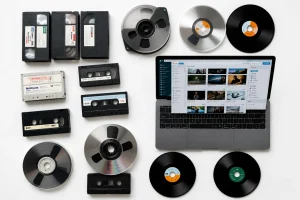
A professional migration partner should handle a broad spectrum of carriers, including:
Magnetic media floppy disks, Zip and Jaz drives, hard drives, and LTO or other data tapes.
Optical media CD-ROMs, DVDs, and Blu-ray discs, which are prone to disc rot.
Solid-state media memory cards, USB drives, and early-generation flash storage.
Other legacy storage removable cartridges, proprietary formats, and obsolete enterprise systems.
The Data Migration Process: Step by Step
A well-run migration follows a structured, repeatable workflow. Here’s what a professional project typically looks like.
-
Assessment and Inventory
Every project begins by cataloguing what you have: formats, quantities, condition, and any known backup software or encryption. This assessment identifies at-risk items and sets migration priorities.
-
Stabilisation and Conservation
Fragile or deteriorating media is stabilised before any data is read. Tapes may be cleaned or baked; damaged drives are handled in controlled conditions to maximise recovery.
-
Controlled Transfer
Data is read using write-blockers, which prevent any accidental changes to the original source. Files are copied while preserving folder structures, filenames, and metadata wherever the source format allows.
-
Verification
This is what separates professional migration from a basic copy. Checksum validation confirms every file transferred without alteration, and automated verification checks accuracy at the bit level. Any discrepancy is flagged and re-run.
-
Delivery and Reporting
Migrated data is delivered to your chosen destination new LTO, cloud, or a hybrid setup accompanied by detailed reporting that documents the workflow, verification outcomes, and integrity status for audit and compliance purposes.
Tape Data Migration: A Special Case
Tape data migration deserves particular attention because tape remains the backbone of large-scale archives. LTO is reliable and cost-effective, but older cartridges written on LTO-3 through LTO-7 become difficult to access once the required drives, catalogue databases, or backup software are retired.
Migration here usually means one of two things: consolidating multiple older tapes onto fewer, higher-capacity current-generation cartridges, or moving the archive entirely to cloud or disk. Either way, the priority is copying readable tapes and verifying them before access depends on hardware or software you can no longer maintain.
Where Migration Fits Within Digital Preservation
Migration is one pillar of a wider digital archiving strategy. Getting files off failing carriers is essential, but it’s only the beginning. True digital preservation means keeping those files organised, authentic, format-appropriate, and ready to use over the long term with ongoing checks, redundant copies, and a plan for future format shifts.
If you’re building a broader strategy, DAMsmart’s Digital Preservation service explains how migrated content is kept future-ready, while the dedicated Data Migration service page covers the recovery side in more detail. You can explore the full range of capabilities on the DAMsmart home page.
When comparing data migration services:
Proven expertise across both legacy and modern media, including fragile and proprietary formats.
Verified workflows with checksums, write-blockers, and documented reporting.
Secure facilities with controlled access and environmental safeguards.
Flexible storage options cloud, LTO, or hybrid matched to your needs.
A track record with institutions similar to yours.
Ready to protect your collection? Get in touch with the DAMsmart team to plan your migration.